4. Acquiring input data (Google Earth Engine / HEC-GeoHMS)
You don't have to already have a DEM/flow-direction/land-cover/rainfall dataset lying around. Two tools cover the "get real data for a real watershed and event" workflow:
4a. vflood-gee — generate a ready-to-paste GEE Code Editor pipeline
vflood-gee rokan15s --bbox 99.70,0.07,101.32,1.93 \
    --event-start 2023-12-15 --event-end 2023-12-27 --outdir gee-scripts/
Writes 00_rainfall_preview.js, 01_topo.js, 02_landcover.js, 03_rainfall_event.js —
paste each into code.earthengine.google.com (opens in a new tab), run
it, then Tasks tab → Run All, and download the exports from Google Drive. This does
not call Earth Engine itself (no interactive auth available here) — it only generates
the script text.
Run 00_rainfall_preview.js first — --event-start/--event-end are an initial
guess, not a final commitment. This script does no export/download: it widens the
given window and renders ui.Chart.image.series (Earth Engine's own inline chart) of
daily areal-average rainfall, so you can see the real rain pattern before committing to
dates and generating the actual 03_rainfall_event.js download. On by default
(--no-rainfall-preview to skip); VFloodPrep has the same checkbox.
Dataset choices match basin-atlas's own already-validated gee-scripts/ convention:
MERIT DEM (or --dem-source hydrosheds_conditioned for HydroSHEDS' own
hydrologically-conditioned DEM instead), ESA WorldCover land cover, and GPM IMERG V07
half-hourly rainfall (aggregated to daily — see below). 04_evapotranspiration.js
(MODIS MOD16A2GF, 8-day composites) is not written unless --include-evapotranspiration
is passed — there's no PET.txt importer yet (see §10), so by default there's nowhere for
that data to feed into on the VFlood-RRI side.
Two real bugs, found from a hand-validated reference script and fixed here rather than copied as-is:
Map.centerObject(ROI, zoom)hits a live Earth Engine centroid bug on some geometries — every script here callsMap.setCenter(lon, lat, zoom)instead, with the center computed in Python from the bbox directly, sidestepping the bug entirely.- Building a per-day image list via a client-side
forloop calling.getInfo()once per iteration (the original approach) is a well-known fragile/slow Earth Engine anti-pattern that can hit request quotas or behave unreliably for longer event windows.03_rainfall_event.jsinstead builds its per-day list via a server-sideee.List.sequence(...).map(...)and exports the whole event window as one multi-band GeoTIFF (one band per day, namedrain_YYYYMMDD), not one export task per day.
Unit correctness, checked rather than assumed: IMERG's precipitation band is a
rate (mm/hr) reported every 30 minutes, not an accumulated depth — summing the 48
raw half-hourly values for one day would overcount its true depth by 2x.
03_rainfall_event.js multiplies each day's sum by 0.5 to correct this, which is
algebraically identical to NASA's own documented method for producing their official
daily IMERG product (mean rate × 24h — confirmed against two independent descriptions of
that method, not assumed). Feeds geo_import.geotiff_multiband_stack_to_raindat on the
import side (§4c) — one multi-band file in, not a list of single-band files.
01_topo.js exports only the DEM by default, at its own true native resolution
(~90m/3 arc-sec, --dem-scale, default: that --dem-source's own native value) — not
GEE's own flow direction/accumulation, and the DEM is never downsampled to match those.
This is deliberate, not an oversight: GEE's WWF/HydroSHEDS/15DIR/15ACC (D8 flow
direction/accumulation, the same D8 encoding VFlood-RRI already uses natively — 1=E,
2=SE, 4=S, 8=SW, 16=W, 32=NW, 64=N, 128=NE) are always derived from HydroSHEDS' own
conditioned elevation surface — pairing them with a different DEM (--dem-source merit, a separately-processed, unconditioned surface) means the routing module ends up
working off two inconsistent terrain representations: flow directions computed against
one elevation surface, depths/gradients against a different one. That's exactly the kind
of thing that produces subtly wrong routing at pits, flats, and reach boundaries — not a
loud failure, just quietly wrong. The recommended path instead: derive flow
direction/accumulation locally, from the exact same DEM array just downloaded, via
vflood-import terrain/pysheds (§4c) or VFloodPrep's Tab 2 (§4e) — both already do
exactly this by design, guaranteeing consistency regardless of which --dem-source was
picked, and matching whatever resolution the DEM happens to be (also a real, checked
constraint: Earth Engine's public catalog has 15DIR/15ACC at 463m and 30DIR/30ACC
at 927m, and a 3-arc-second drainage direction (03DIR, ~90m) — but no
3-arc-second flow accumulation product at all, confirmed directly against Earth
Engine's own catalog pages, so a genuinely ~90m flow network isn't obtainable from GEE
alone regardless of --scale).
Pass --include-gee-flow-network to also export GEE's own 15DIR/15ACC alongside the
DEM anyway (--scale, default 463m, controls only that export) — for deliberately
comparing against GEE's own network, or as a pysheds-free fallback specifically when
--dem-source hydrosheds_conditioned (the one case where the two elevation surfaces
are the same, so no inconsistency); the generated script prints an explicit warning
in its own comments if --dem-source doesn't match.
4b. vflood-import — convert those (or HEC-GeoHMS/ArcHydro) GeoTIFFs into VFlood-RRI's format
vflood-import raster dem.tif --as dem --out topo/adem.txt
vflood-import raster dir.tif --as dir --out topo/adir.txt --hydrosheds
vflood-import raster acc.tif --as acc --out topo/acc_15s.txt
vflood-import raster landcover.tif --as landuse --out topo/landuse.txt
vflood-import rain day000.tif day001.tif ... --out rain/rain.dat
vflood-import rain-geotiff-stack rain_stack.tif --out rain/rain.dat--hydroshedsremaps HydroSHEDS' inland-sink code (stored as byte value 255) to the -1 VFlood-RRI actually checks for — only needed for--as diron HydroSHEDS data.--as landusealso prints a suggested Manning's-n parameter table per land-cover class (from standard overland-flow roughness references) — a starting point for calibration, the same spirit asbasin-atlas's own clay%→HSG→CurveNumber lookup, not a substitute for it.vflood-import rainimplements RRI's own daily→hourly rain.dat convention exactly (confirmed against the realrokan15s_rain.dat/gauge_1d.txt pair) — a sequence of single-band GeoTIFFs (one per day, in mm/day),--divide 24(the default) spreads each day evenly into mm/h.vflood-import rain-geotiff-stackis the same convention, but for one multi-band GeoTIFF (one band per day) instead of a list of single-band files — whatvflood-gee's own03_rainfall_event.js(§4a) produces. Reads each band in file order viageo_import.read_geotiff_stack, which also recovers each band's own name (e.g.rain_20231215) from the GeoTIFF's GDAL band descriptions, when present, for verification.
This same vflood-import raster path works for HEC-GeoHMS/ArcHydro delineation
output too, not just GEE exports — both use the identical ESRI D8 flow-direction
encoding, so a HEC-GeoHMS-delineated basin's flow direction/accumulation grids need
no re-encoding, only this GeoTIFF→ascii-grid format conversion.
4c. Indonesian data sources (DEMNAS/BATNAS, satellite rainfall NetCDF, VRain)
These sit alongside §4's GEE/HEC-GeoHMS path — same vflood-import command, more
subcommands — for when your data already comes from a national/Indonesian source
instead of a Google Earth Engine export.
vflood-import terrain — derive flow-direction/accumulation locally from a DEMNAS/BATNAS DEM
vflood-import terrain demnas_8m.tif --outdir topo/Runs pit-filling, depression-filling, D8 flow-direction, and flow-accumulation
directly on the DEM (via pysheds) and writes dem.txt/dir.txt/acc.txt — a
DEMNAS/BATNAS-resolution basin never needs the GEE/HydroSHEDS round-trip from §4a at
all. pysheds' own default D8 direction codes already match VFlood-RRI's own convention
(same ESRI/ArcGIS encoding noted in §4a), confirmed by explicit lookup rather than
assumed. --no-fill-pits skips the single-cell pit-filling pass if you've already
conditioned the DEM yourself.
vflood-import rain-netcdf — gridded satellite rainfall NetCDF (CHIRPS/GSMaP/IMERG) to rain.dat
vflood-import rain-netcdf chirps_daily.nc --out rain/rain.datReads the file at its own native grid resolution (no remapping happens at import
time — same division of responsibility as vflood-import rain's GeoTIFF path) and
prints the corner/cellsize you then paste into RRI_Input.txt's
xllcorner_rain/yllcorner_rain/cellsize_rain fields; VFlood-RRI's own
rainfall.py remaps to the model grid at simulation run time. Variable/dimension
names and units are auto-detected (CHIRPS's precip, GSMaP/IMERG-style
precipitationCal, lat/lon vs latitude/longitude vs y/x, mm/mm/h/
mm/day) since real products don't agree with each other — pass --var/--lat-dim/
--lon-dim/--time-dim/--units explicitly if auto-detection picks the wrong one.
vflood-import rain-vrain — VRain's own station output, Thiessen-weighted, to rain.dat
vflood-import rain-vrain manifest.csv --out rain/rain.dat --extent-from RRI_Input.txtReads a VRainMaster-style manifest (Station,X,Y,DailyFile,SubDailyFile,AMSFile,
paths relative to the manifest's own folder) plus each station's Time,Rain/
Date,Rain CSV (same flexible EN/ID column-keyword detection VRain's own tools use —
hujan/curah/tanggal/waktu work as well as rain/date), and builds a genuine
multi-gauge rain.dat at the model's own grid resolution (--extent-from loads it via
load_model) — each cell takes its value from whichever station's Thiessen polygon
contains that cell's center (--method thiessen, the default, needs ≥3 stations;
--method nearest is a simpler fallback for 1-2). This replaces the single-gauge-
for-the-whole-basin limitation the original rainThiessen.txt utility has.
vflood-import raster --as landuse --scheme klhk — same land-cover remap as §4b's
--as landuse, but against KLHK's "Penutupan Lahan" (Indonesian national land-cover)
class codes instead of ESA WorldCover's. Same caveat as WorldCover's table, doubly
so: KLHK's numeric class coding is less rigidly standardized across product
vintages, so treat the shipped table as a starting point to edit against your actual
raster's own attribute table.
4d. vflood-import init — one DEM in, a ready-to-run project out
Every path above still ends with you hand-editing RRI_Input.txt and manually
matching each input's grid to the others. init closes that gap: give it a raw DEM
(e.g. a HydroSHEDS/DEMNAS/BATNAS tile) plus a rainfall source, and it derives
terrain, resamples the rainfall onto the DEM's own grid, and writes a complete,
loadable RRI_Input.txt in one call.
vflood-import init dem.tif --rain-netcdf chirps_daily.nc --outdir project/
vflood-import init dem.tif --rain-geotiffs day000.tif day001.tif ... --outdir project/
vflood-import init dem.tif --rain-netcdf gsmap.nc --landuse worldcover.tif --outdir project/

vflood-rri project/RRI_Input.txt        # runs immediately
The DEM is the anchor ("patokan") — every other input is resampled onto its exact
grid (same extent, same cellsize, same (ny, nx)) via grid_align.resample_to_grid
(rasterio.warp.reproject under the hood: bilinear for rainfall/elevation, nearest
for land-use/categorical data — averaging class codes would be meaningless). This is
what makes "a DEM from HydroSHEDS and rainfall from wherever, at whatever native
resolution" line up automatically instead of requiring every input to already share
one grid the way vflood-import rain-netcdf's non-aligned path does (§4c — that path
prints a corner/cellsize for you to paste in by hand; init never needs that step,
because the write is already on the DEM's own grid).
What it writes, under --outdir:
topo/dem.txt,topo/dir.txt,topo/acc.txt— viadem_terrain.derive_flow_network(pysheds), same asvflood-import terrain(§4c)topo/landuse.txt— only if--landuseis given (--scheme worldcover|klhk, §4b/§4c)rain/rain.dat— resampled onto the DEM's grid, viarain_netcdf_import.netcdf_rainfall_to_raindat_aligned(--rain-netcdf) orgeo_import.geotiff_stack_to_raindat_aligned(--rain-geotiffs)RRI_Input.txt— via a newconfig.write_rri_input, the writer counterpart toread_rri_input(same field order as RRI_Read.f90, so aninit-scaffolded project loads exactly like a hand-written one)
Hydraulic parameters are generic, conservative placeholders, not a calibrated
model. lasth/outnum default to the rainfall's own duration (in whole hours)
plus a 6-hour recession tail; ns_river=0.03, single-class ns_slope=0.3 (or, with
--landuse, the per-class Manning's-n table §4b's land-use remap already suggests);
river width/depth come from RRI's own power-law auto-generation
(width_param_c/s, depth_param_c/s) with generic coefficients, not
rivfile_switch=1 measured cross-sections. Infiltration and groundwater are off
(ksv=ka=ksg=0, which RRI_Read.f90's own derivation rules render inert — see
RRIConfig's docstring) so the very first run is the simplest possible
surface-routing-only model: it runs, but treat it as a starting scaffold to calibrate
against your basin, not a finished setup — same disclaimer as _remap_landcover_to_landuse's
suggested land-use table.
Options:
--outdir <path>                        required: project folder to create/fill
--rain-netcdf <file.nc>                 gridded rainfall NetCDF (exactly one of the three --rain-* below)
--rain-geotiffs <file1.tif> <file2.tif> ...   a sequence of single-band rainfall GeoTIFFs, one per day
--rain-geotiff-stack <file.tif>         ONE multi-band rainfall GeoTIFF, one band per day -- what
                                        vflood-gee's IMERG export (§4a) produces
--rain-units mm|mm/h|mm/day             --rain-netcdf only (default: auto-detect)
--rain-var <name>                       --rain-netcdf only: rainfall variable name
--divide 24.0 / --seconds-per-band 86400.0   --rain-geotiffs/--rain-geotiff-stack only (same meaning
                                        as vflood-import rain/rain-geotiff-stack, §4b)
--landuse <file.tif> --scheme worldcover|klhk   optional land-use raster
--fill-pits / --no-fill-pits           DEM pit-filling before flow derivation (default: on)
--lasth <hours> --outnum <n>           override the auto-derived simulation length/output count
--dt 30 --dt-riv 10                    slope/river timestep, seconds
--dem-aggregate-factor <n>             running/output resolution: coarsen the DEM by this
                                        integer factor before deriving dir/acc (see below)
Running/output resolution (--dem-aggregate-factor): a real DEM export can be
large enough that a full-length run is impractical (a 342-hour event on a 2154×2088,
~93m DEM is 4.49M active cells) — --dem-aggregate-factor N coarsens the DEM by a
block-average (grid_align.resample_to_grid(..., method="average") — the correct way
to shrink a continuous field like elevation, not point-sampling it) before flow
direction/accumulation are derived, so routing stays consistent with whichever
resolution actually ships (same "derive from the exact same surface" principle §4a's
GEE-flow-network warning is built on — just applied to a self-imposed coarsening
instead of a mismatched external source). Rainfall/land-use then align onto that
coarsened grid automatically, same as always. N must evenly divide the DEM's own
ncols/nrows exactly — this fails loudly rather than silently cropping a partial
edge row/column, so check gcd(ncols, nrows) first if an arbitrary factor is
rejected (a real 2154×2088 tile, for example, only accepts 1/2/3/6 — gcd(2154,2088) = 6). Omit it (default) to run at the DEM's own native resolution. Available in
VFloodPrep's Tab 2 (§4e) as "Running/output resolution factor" under Advanced.
Land-locked at latlon (utm=0) like every other local project in this manual;
hydro gauge locations (hydro_switch/location.txt) aren't part of the scaffold —
add them by hand afterward once you know which cells you care about.
4e. vflood-prep (VFloodPrep) — a desktop front end for §4/§4d
vflood-prepOpens a two-tab window that wraps §4a's vflood-gee and §4d's
vflood-import init behind a form instead of flags, the same
generate-a-script / process-what-comes-back split the VRain suite's own
VRainDownload uses for satellite rainfall:
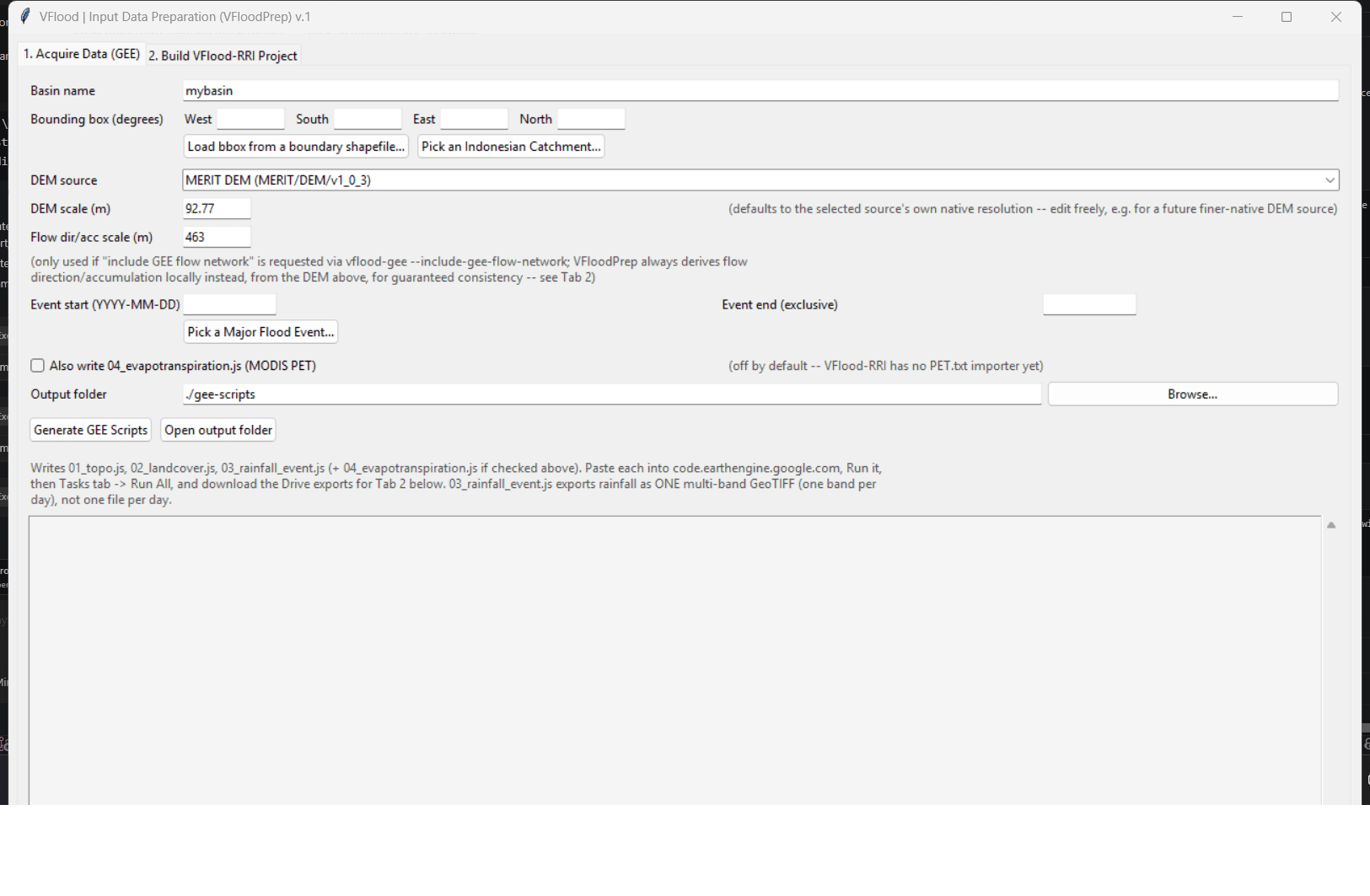
- Tab 1 — Acquire Data (GEE): basin name, bounding box (typed in, loaded
from a boundary shapefile/GeoJSON/GeoPackage via
geopandasif installed, or picked from a real Indonesian catchment — see below), DEM source (MERIT or HydroSHEDS Conditioned) with its own editable DEM scale (m) field (auto-refreshes to that source's native resolution — ~92.77m for both current options — whenever the source dropdown changes; edit freely for a different resolution), a separate Flow dir/acc scale (m) field that only matters if you deliberately request GEE's own flow network viavflood-gee --include-gee-flow-networkon the command line afterward — Tab 1 itself never exports that network, always deriving it locally instead (Tab 2, below) for guaranteed consistency with whichever DEM source was picked, event start/end dates (typed in, or picked from a real major flood event — see below), and a checkbox for whether to also write04_evapotranspiration.js(off by default — no PET.txt importer exists yet, see §10). "Generate GEE Scripts" writes the same pipeline §4a describes —03_rainfall_event.jsexports rainfall (IMERG) as one multi-band GeoTIFF, one band per day, not one file per day.
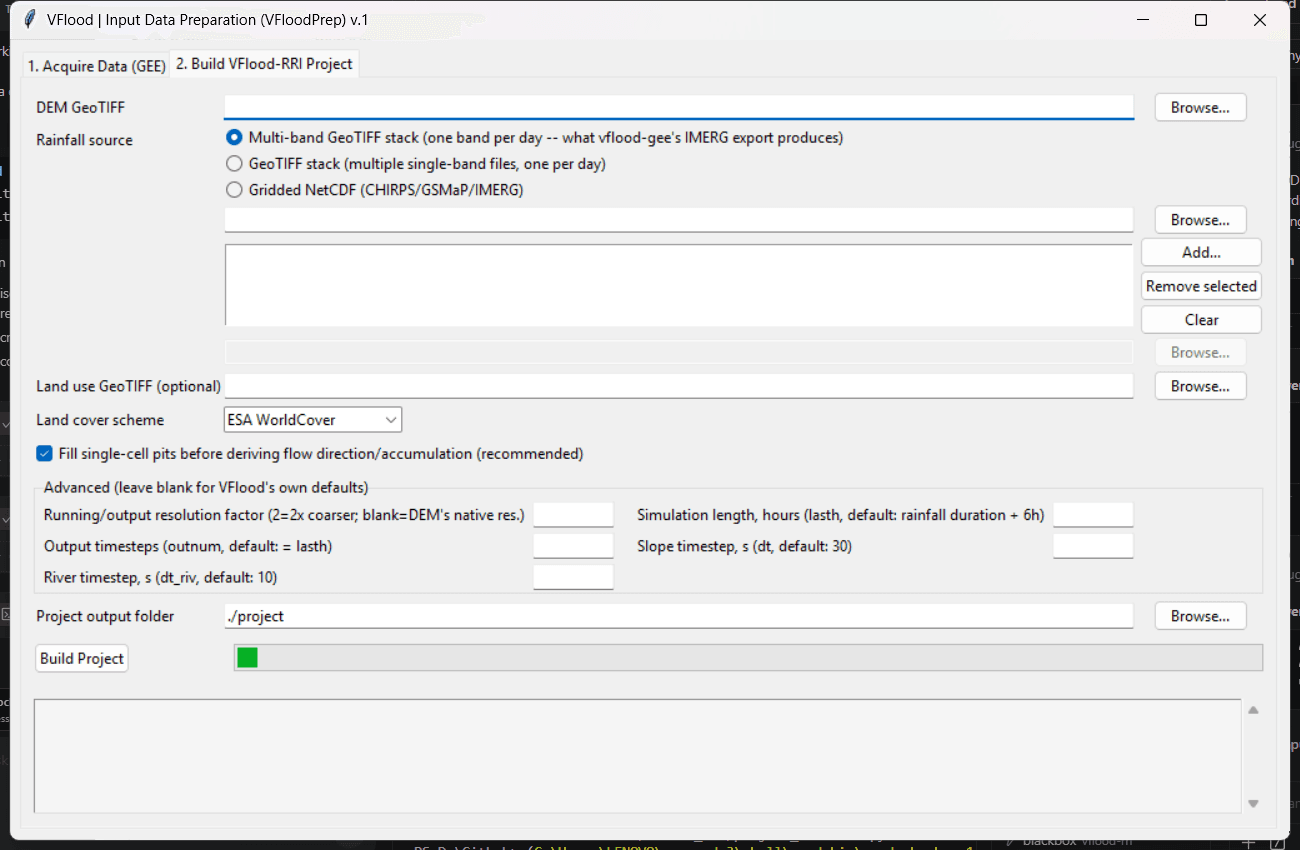
- Tab 2 — Build VFlood-RRI Project: pick the downloaded DEM GeoTIFF, a
rainfall source — the multi-band GeoTIFF stack Tab 1 just produced
(the default radio option), a list of single-band GeoTIFFs, or a
gridded NetCDF — and optionally a land-cover GeoTIFF + scheme; "Build
Project" runs
project_scaffold.scaffold_project(§4d) in a background thread so the window stays responsive while pysheds derives flow direction/accumulation, and reports the resultingRRI_Input.txtpath when done. The Advanced section's "Running/output resolution factor" field is--dem-aggregate-factor(§4d) — leave blank to run at the DEM's own native resolution, or set an integer (e.g.6) to block-average the DEM coarser first, for a lighter/faster run on a large real-world DEM export; must evenly divide the DEM's own grid dimensions, and the error message says so if it doesn't.
"Pick an Indonesian Catchment..." (next to the bbox fields) opens a search
dialog — "Pick an Indonesian Catchment (DAS)" — over a separate sibling
project's own data: basin-atlas (D:\OneDrive\Website-projects\basin-atlas),
a Next.js/Leaflet DAS explorer that has already delineated ~17,000
catchments covering all of Indonesia. Only the ~8,300 officially named
ones are loaded by default (named_only=True) — the rest are small,
administratively-insignificant sub-catchments not worth scrolling past, and
skipping them makes the dialog noticeably faster to open/search too. The
table has five sortable columns — click any header to sort by it,
click again to reverse — Code, Name, Agency, River Basin (Wilayah
Sungai) (the official KemenPU/PUPR river-basin-region delineation, joined
in per catchment), and Area; agency/river-basin values have their source
data's own literal "BPDAS "/"WS " prefixes stripped for display (e.g.
"BPDAS KRUENG ACEH" reads as "KRUENG ACEH") — internal field-naming
conventions from basin-atlas's own JSON, not something to show verbatim in
a UI meant for people. Search matches name, code, agency, or river basin.
Picking a catchment fills the bbox fields with its own extent plus a
buffer (5km default, adjustable in the dialog) — a DEM cropped exactly to
a watershed boundary routinely misroutes flow right at the edge, since
accumulation needs to see slightly past the divide, so the buffer is
deliberate, not padding for its own sake.
Implemented in basin_atlas.py, which reads only basin-atlas's own
gee-scripts/output/basin_index.json (a pre-computed bbox per catchment —
no geopandas/shapely needed, works without the geo extra), das_lookup.json
(name/agency), and ws_lookup.json (parent river basin — already a direct
per-catchment join in basin-atlas's own data, no spatial lookup needed on
this end); the picker itself (gui_common.open_catchment_picker) is shared
with VFloodControl's own embedded "Prepare Data" step (§4f) — one
implementation, not two. If that data isn't present on your machine, the
button says so and you fall back to typing coordinates or loading a
shapefile.
"Pick a Major Flood Event..." (next to the Event start/end fields) does the
same for the date half of Tab 1, against a second sibling project's data:
disasterLab (D:\OneDrive\Website-projects\disasterLab), a compiled BNPB
DIBI 2008-2024 record of ~15,600 flood events across Indonesia. Only events
with a known location (real lon/lat) and at least one recorded casualty
(dead/missing/injured) are ever shown — ~460 of the ~15,600, the "was this
actually significant" filter BNPB's own data doesn't provide as a single
flag, computed from meninggal + hilang + terluka > 0 — filtered down further
to whichever fall inside the current bounding box (so pick a catchment,
or set the bbox some other way, before this button does anything useful).
Default sort is by deaths descending, so the worst event leads; columns
(Date, Location, Deaths, Missing, Injured, Flashflood) are sortable the same
way the catchment picker's are.
Picking an event fills Event start/end with a buffered window around its
one reported day — 3 days before, 10 days after by default, both adjustable
in the dialog — since BNPB's data is a single report date, not a range, and a
hydrograph needs the padding to actually show a rising limb (antecedent
rainfall) and a recession (the flood wave draining back down), not just the
single day of the report; widen the "after" buffer for a larger basin whose
flood wave takes longer to recede. (The dialog pads one extra day past
whatever "days after" you set, invisibly — ee.ImageCollection.filterDate's
end is exclusive, so without it the last requested day of recession would
silently be missing from the actual rainfall/PET export.)
Implemented in disaster_events.py, reading only disasterLab's own
web/public/data/events.json — plain JSON, no live BNPB API call anywhere,
no geopandas/shapely dependency (catchment matching is a bounding-box
containment check against the event's own point, not a true polygon test —
a deliberate simplification, so events right at a catchment's corner may be
a little over/under-inclusive). One real data-quality issue found and
handled explicitly: disasterLab encodes "no known coordinates" as literal
x=0, y=0, not null — confirmed directly against the data (~920 of 1,384
"major" events carry that exact sentinel) and excluded explicitly, since an
unfixed reading would have silently treated ~2/3 of "geocoded" major events
as sitting in the Gulf of Guinea. If disasterLab's data isn't present on your
machine, or no qualifying events fall inside the current bbox, the button
says so and you fall back to typing dates in by hand.
No new library logic lives in the GEE/scaffold half of this module — both
buttons call straight into gee_codegen/project_scaffold, so a fix or new
dataset added to either is picked up here automatically. Requires the geo
extra (pip install vflood-rri[geo]) for Tab 2 and for shapefile-based bbox
loading; Tab 1's script generation, the catchment picker, and the flood
event picker have no extra dependencies beyond Tkinter (stdlib) and plain
JSON.
4f. vflood-control (VFloodControl) — orchestrates the whole pipeline
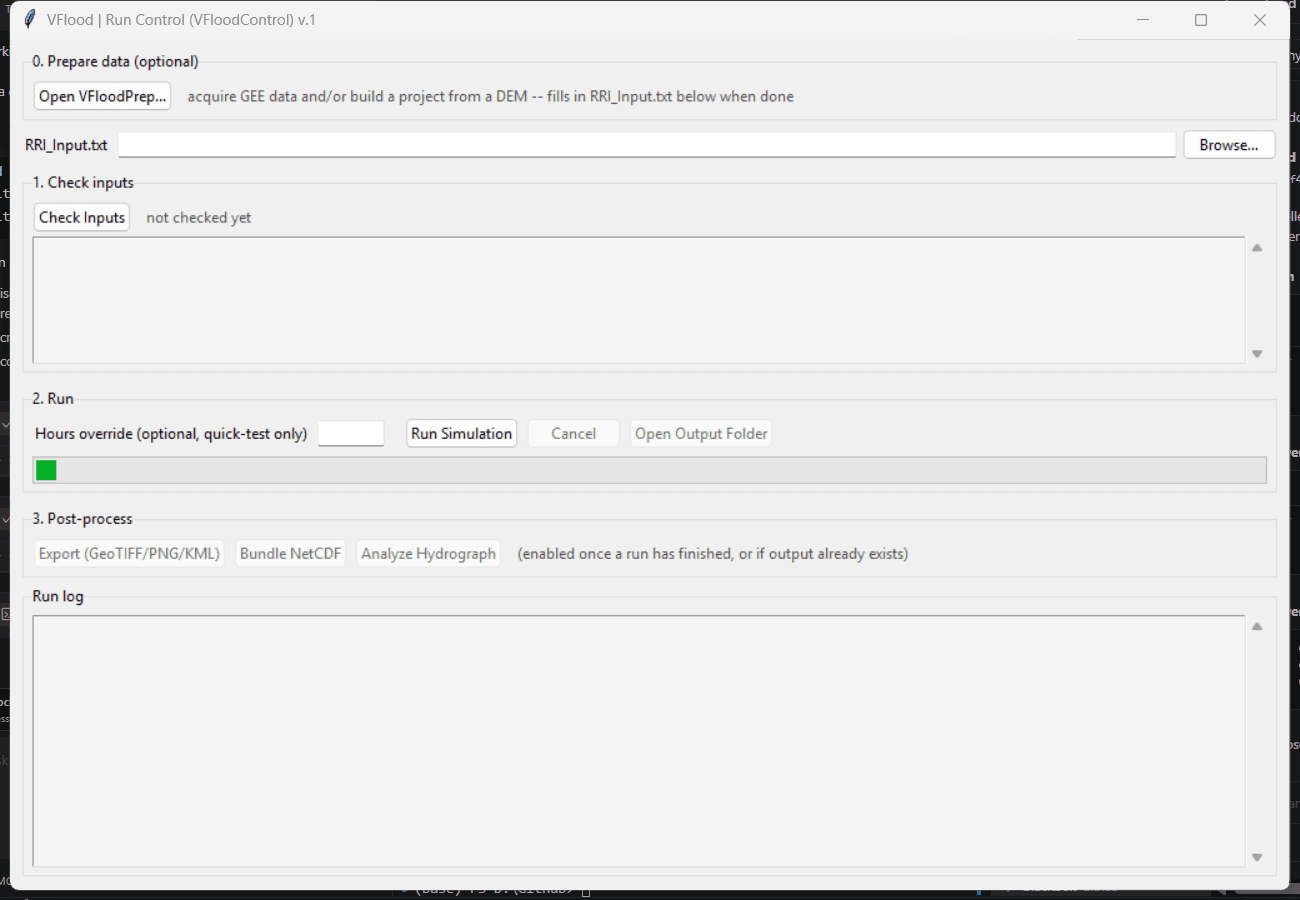
vflood-controlWhere §4e's VFloodPrep ends and §6-§8's export/NetCDF/analyze tools begin, VFloodControl ties everything together into one window — not by reimplementing any of those stages, but by linking to them: it's the orchestrator, not a fourth independent tool. Four sections, top to bottom:
- 0. Prepare data (optional) — "Open VFloodPrep..." opens §4e's VFloodPrepApp
embedded in this same process (a child window, not a subprocess —
vfloodprep_gui.pynow takes anon_project_builtcallback for exactly this). Build a project there the same way you would standalone, including picking a real Indonesian catchment from basin-atlas (§4e), and the resultingRRI_Input.txtpath is written into the field below automatically the moment it's ready — no copy-pasting a path between two separate windows. - 1. Check Inputs — unchanged from before:
validate.validate_projectagainst the loadedRRI_Input.txt, one PASS/WARN/FAIL line per check (file parses; every switch-enabled file exists;dem/dir/acc/landuseactually share one grid — shape and corner and cellsize, a gapload_topographyitself never closes;rain.dat's grid actually overlaps the model extent —build_cell_remaphas no bounds check at all; timing sanity; output folder writability; fullload_model). If a project already has.outfiles on disk (run previously, maybe outside this GUI), Check also detects that and unlocks §3 immediately, without requiring a fresh run first. - 2. Run —
cli.run_project, the exact functionvflood-rriitself calls, in a background thread with a live log, an hours override for quick tests, and Cancel (stops at the next output checkpoint, keeping everything already written). An exception anywhere in the run is caught, shown in red, and surfaced in a dialog — not a stack trace scrolling past in a console window that's easy to miss. - 3. Post-process — the actual point of the orchestration, not just a suggestion: three
buttons launch
vflood-export/vflood-netcdf/vflood-analyzeas real subprocesses (python -m vflood_rri.<tool>, the same invocation a terminal would use — no reimplemented export/plotting/stats logic in this GUI, and no risk of their matplotlib rendering colliding with this app's own Tk event loop), streaming each tool's own stdout/stderr into the run log below.- Export —
hs,geotiff,png(kml is left out of the one-click default since it needs--start, a real-world date this button doesn't collect — run it from a terminal for the Google-Earth-timeline version). - Bundle NetCDF —
hs,hr,qrintosimulation.nc. - Analyze Hydrograph — reads
RRI_Input.txt's ownhydro_switch/location_file(no extra dialog needed, since the project already declares its own gauge points); ifsimulation.ncdoesn't exist yet, bundles it first, automatically, then runsvflood-analyze hydrograph— two tools, one click. If the project has no gauge locations configured, says so rather than guessing, and points atvflood-analyze zonal/moran(run from a terminal) for spatial analysis instead, since those need a zone-polygon file this GUI has no sensible default for. - Enabled once §2 finishes, or as soon as §1's Check detects pre-existing output. Open Output Folder (§2) is one click from there into a GIS tool.
- Export —
No new physics, file-format, or GIS logic lives anywhere in this module — every stage is
either a direct call to already-tested library code (validate.py, cli.run_project) or
a subprocess call to the exact CLI tools §4-§8 already document. VFloodControl itself needs
no geo extra for §1/§2/§3's core wiring (only §0's embedded VFloodPrep needs it, same
as standalone VFloodPrep does) — validate.py/cli.py only touch
config.py/grid.py/rainfall.py/engine.py, none of which import
rasterio/pysheds/netCDF4.
4g. Catchment masking and automatic checkpoint placement (watershed.py)
A rectangular DEM export (VFloodPrep's own default — a GEE/HEC-GeoHMS bbox is always a
rectangle) is not the same thing as a delineated watershed. RRI itself doesn't require
one — RRI.f90:228-245's own domain=0/1/2 mechanism already tolerates any number of
simultaneous open-boundary "outlet" cells wherever a flow path happens to reach the
rectangle's edge or an internal sink, and VFlood-RRI's own indexing.py/kernels/river.py
replicate that exactly. What a raw rectangle doesn't give you: (1) any inflow from
upstream area that falls outside the box is silently missing, and (2) every place a river
crosses the box's edge becomes its own artificial "outlet," none of which represent a real
downstream condition. watershed.py scopes the domain down to just the cells that actually
drain to one or a few real river mouths — available via vflood-import init (§4d):
vflood-import init dem.tif --rain-geotiff-stack rain_stack.tif --outdir project/ \
    --auto-mask-outlets --max-outlets 1 --auto-locations 0,0.5,1
Masking (pick at most one):
--auto-mask-outlets— no polygon or coordinates needed: finds the domain-edge cell(s) with the highest flow accumulation and masks to their catchment(s).--max-outlets Ncaps how many are considered —1for a single-DAS study, higher for a deliberately regional run (see below).--pour-point lon,lat(repeatable) — mask to the catchment(s) draining to specific points, each snapped to the nearest real high-accumulation channel cell first — the same "click near the river, don't worry about landing exactly on the channel cell" convenience a sibling project, VBasinFlow, calls "smart outlet placement," reimplemented independently here. VFloodPrep's own "Pick Outlet(s)..." button fills this in interactively instead — no map canvas, deliberately as simple as possible: a table of auto-detected candidates (same detection--auto-mask-outletsuses, largest contributing area first), select one or more.--catchment-boundary boundary.geojson— mask to an already-known polygon (an official BIG/BWS DAS boundary, or a basin exported from a dedicated delineation tool like VBasinFlow's own Strahler-ordered SHP export — reprojected to EPSG:4326 automatically if it's in UTM/projected).
Masked-out cells get the DEM's own nodata value (forced <= -100.0) — RRI's own domain
classification (zs > -100.0) is what actually excludes them, so masking needs no new
domain logic on the simulation side, and applies before --dem-aggregate-factor's own
resampling (§4d) so the masked boundary stays precise regardless of running resolution. On
a real 2154×2088 GEE DEM export (Sesayap basin, aggregated 6x first), masking to just the
single dominant outlet's catchment cut the already-aggregated 124,834-cell rectangle down
to 41,711 active cells — masking and resolution are independent, compounding levers.
A real, empirically-confirmed limitation found along the way: pysheds.grid. Grid.catchment() was tried first and found to systematically exclude valid upstream cells
along the raster's own edges — confirmed on a synthetic DEM where every cell provably
drains to one outlet, yet catchment() returned a mask missing the entire boundary ring.
watershed.py's own delineation is a plain upstream flood-fill instead, built on the same
D8 direction table indexing.py already uses.
Automatic checkpoint placement, independent of masking: --auto-locations 0,0.5,1
writes location.txt from fractional positions along each detected outlet's own main
channel — 0 = most-upstream point, 1 = the outlet, by real geodesic distance along the
path. The main channel is traced upstream from the outlet, always following whichever
branch has the higher flow accumulation at each confluence. One outlet ->
basin_f0.00/basin_f0.50/basin_f1.00; several (a regional run) -> basin1_f0.00,
basin2_f0.00, etc. Sets hydro_switch=1 automatically, so the project is immediately
ready for §8's vflood-analyze hydrograph/combined.
Regional multi-basin studies (a province spanning several separate river systems, like
the Aceh/North Sumatra November 2025 flooding): since RRI's own domain mechanism already
handles any number of simultaneous outlets natively, a single run over one wide bbox
covering the whole region simulates every river system in it simultaneously, each with
its own independently-named hydrograph — no basin-partitioning or multi-run coupling
needed. Combine with --dem-aggregate-factor (§4d) for a tractable running resolution at
that scale.
Full options:
--catchment-boundary <path>            mask to this GeoJSON/shapefile polygon
--pour-point <lon,lat>                 mask to the catchment draining here (repeatable)
--auto-mask-outlets                    mask to auto-detected outlet(s), no polygon/coords needed
--max-outlets <n>                      cap how many outlets masking/--auto-locations considers
--auto-locations <f1,f2,...>           auto-write location.txt from main-channel fractions
                                        (0=upstream, 1=outlet), works with or without masking
Available as a library directly too (from vflood_rri import watershed) — also exposed in
VFloodPrep's GUI (Tab 2) as a "Catchment masking" section (auto-mask or boundary polygon,
plus auto-locations fractions; --pour-point's multi-coordinate input stays CLI/library-only).
4h. Antecedent rainfall spin-up (scaffold_project_with_spinup)
A model that starts bone-dry (hs=hr=0 at t=0) can under-represent a storm's true peak
when there's no soil-moisture/baseflow memory behind it. vflood-import init-with-spinup
closes that gap — not by importing an external soil-moisture dataset (SMAP/GLDAS/
ERA5-Land all exist on GEE, but none has a validated 1:1 mapping onto RRI's own hs/hr
state), but by actually running a warm-up simulation on real antecedent rainfall and
feeding its final state into the real event run, via the same file-based resume mechanism
§2 already documents:
vflood-import init-with-spinup dem.tif --rain-geotiff-stack combined_rain.tif \
    --spinup-days 10 --outdir project/

vflood-rri project/event/RRI_Input.txt        # the actual event run, already warm-started
--rain-geotiff-stack is one combined download spanning both the warm-up period and
the event (widen 03_rainfall_event.js's own date range rather than two separate
exports); --spinup-days N says how many leading bands are the warm-up
(geo_import.slice_geotiff_stack splits the file). Writes and runs <outdir>/spinup/
first (its own lasth forced to exactly spinup_days*24 hours), then scaffolds
<outdir>/event/ with init_slo_switch=1/init_riv_switch=1 pointing at the spin-up's
final output — the event project's own lasth stays exactly the event's own duration,
never extended by the spin-up. --no-run-spinup scaffolds both without running the
spin-up (run it yourself first). VFloodPrep Tab 2 has the same capability as an
"Antecedent rainfall spin-up" checkbox + days field.